Hide names before sharing text, transcribe a recording, or add chat. Explore models that run on the user's device, then use the same tools in your Swift app.
Community projects for Apple's Core AI runtime. Check each model's device requirements and verification record below.
A feature you can see
A copy to share, with personal details removed.
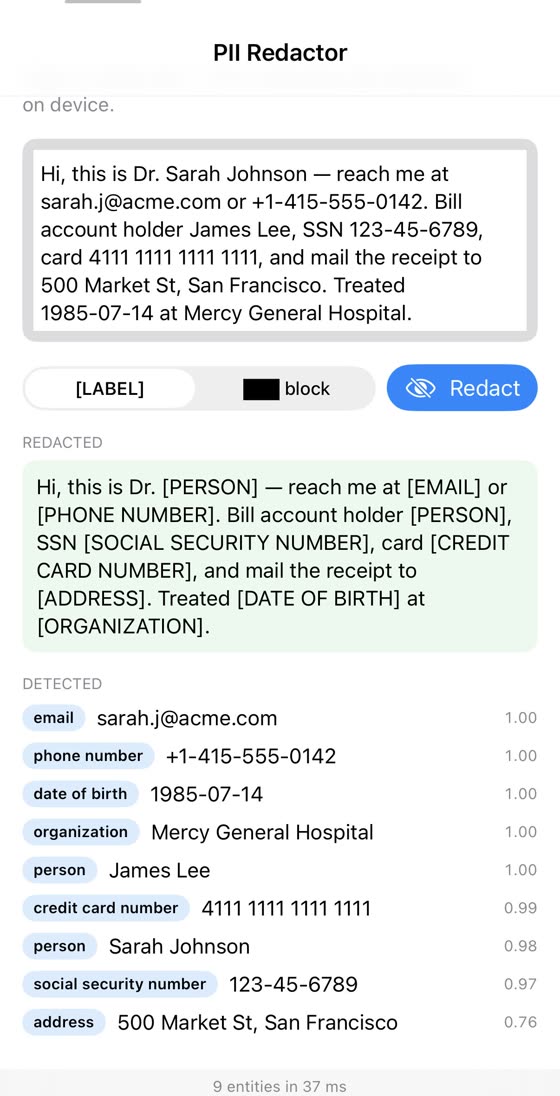
This example finds names and contact details in text, then replaces them with labels such as [PERSON] and [EMAIL]. The model runs on the device.
Local inference avoids a per-request inference API bill. Account for the model download, processing time, and memory use, and let people review the redactions before sharing.
Real-device GLiNER2 demonstration, July 2026. Nine detections in this English sample. The exact capture day and Kit version were not recorded; this image is separate from the September 0.4.1 checks.
Choose your next step
From a first reply to your own feature.
Use the app to try a model, the Swift package to integrate it, or the catalog to compare options for your device.
01No coding needed
Try chat on your Mac
CoreAI Zoo is a downloadable Mac preview. Start with the small Qwen3 0.6B chat model.
Open the DMG and drag CoreAIZoo into Applications.
Open Chat, choose Qwen3 0.6B, then Download & Load.
If Apple's built-in model meets your needs, start with Foundation Models. CoreAIKit adds a route to models you choose.
03Find a model for your task
Compare before downloading
Find chat, vision, audio, and other models with conversion recipes and verification notes. Check the device support, download size, model terms, and measurements for your chosen variant.
33 seconds · CoreAIKit 0.4.1 · Mac Studio M4 Max · September 9, 2026. Cached models at normal speed; builds and first downloads are omitted.
A recorded Mac run
A local answer, then speech.
The public ChatDemo runs Qwen3 0.6B, then Speak generates audio with VoxCPM 0.5B. The recording details include exact versions and commands so you can see what was run.
A terminal runs the chat example with a question about Japan's capital and displays the model's answer. The speech example generates and plays a WAV from “Hello from Core AI.” The run uses macOS 27 beta 26A5416b, Xcode 27 beta 5 27A5237l, and SDK 26A5406c. It records the Mac run, with separate first-download and conversation checks linked in the release.
Working with a coding agent?
Have your agent add the feature.
Add local chat, vision, or speech to an existing Swift app. The integrate-coreai skill checks the package version and device variant, then guides download handling and app integration.