CoreAIKit
Cookbook — “I want to …”
Reverse lookup: find your task, copy the snippet. Everything runs fully on device (macOS 27 / iOS 27) and downloads its model from the Hugging Face Hub on first use.
One product, one import: import CoreAIOps re-exports the model layer, so every
snippet on this page compiles with that single import. Most entries are task ops:
one line, the kit resolves and caches a catalog model behind the call, and
options: .model("catalog-id") swaps it. Entries that need state — a conversation, a
camera loop, a persistent index — use the model-level APIs; starting with an op and
dropping down later is a refactor, not a rewrite.
The “In → out” one-liners below are also API: every op carries the same summary as
CoreAI.Op.summary (with defaultModelID), so a picker or gallery UI renders straight
from Op.allCases.
| I want to… | Call | In → out |
|---|---|---|
| summarize text | CoreAI.summarize(text) |
Text → short summary |
| pull typed values out of text | CoreAI.extract(text, as: T.self) |
Text → typed value (@Generable) |
| translate | CoreAI.translate(text, to: .english) |
Text → translation in a named language |
| fix grammar and typos | CoreAI.proofread(text) |
Text → corrected text |
| clean up a dictation transcript | CoreAI.tidyTranscript(raw) |
Raw ASR transcript → written text |
| redact PII | CoreAI.redact(text) |
Text → text with PII replaced by labels |
| find names/emails/anything in text | CoreAI.extractEntities(from:labels:) |
Text → entities by zero-shot label |
| decide something about text, with a probability | CoreAI.decide(state, questions) |
State + typed questions → answers with probabilities |
| decide something about an image, with a probability | CoreAI.decide(image: photo, state, questions) |
Image + state + typed questions → answers with probabilities |
answer a /v1/systemone request in-process |
CoreAI.systemOne(json:) |
The hosted request form → the hosted response, typed answers beside it |
| give Claude Code / Codex / Cursor a decision tool | systemone mcp |
An MCP server on stdio: tools decide, models |
| chat with a local LLM, streaming | ChatSession |
Prompt ⇄ streamed conversation |
| let the model call my functions | KitLanguageModel + FM tools |
Prompt → answer via your tools |
| get schema-valid JSON, guaranteed | guided generation | Prompt → schema-valid JSON |
| describe a photo | CoreAI.caption(photo) |
Image → description |
| ask questions about an image | KitVisionModel session |
Image + questions ⇄ conversation |
| find objects in an image | CoreAI.detect(in: photo) |
Image → labeled bounding boxes |
| get a depth map | CoreAI.estimateDepth(in: photo) |
Image → relative depth map |
| upscale a photo ×4 | CoreAI.upscale(photo) |
Image → ×4 upscaled image |
| turn a scan into Markdown | CoreAI.read(documentAt: url) |
Document image → markdown text |
| search my photos by meaning | CLIP ImageTextEncoder |
Image / text → shared vector |
| search document pages without OCR | VisualDocumentRetriever |
Query + page images → ranking |
| rank strings by meaning | CoreAI.search(query, in: docs) |
Query + strings → ranked matches |
| build on-device RAG | TextEmbedder + retrieval tool |
Notes → grounded answers |
| transcribe speech | CoreAI.transcribe(url) |
Audio file → plain-text transcript |
| know who said what | CoreAI.transcribeMeeting(url) |
Audio file → speaker-attributed transcript |
| describe sounds, not just words | CoreAI.describeAudio(url) |
Audio file → description of the sounds |
| speak text aloud | CoreAI.speak(text) |
Text → synthesized speech (PCM) |
| generate music from a prompt | CoreAI.compose(prompt) |
Prompt → generated music (PCM) |
| split vocals from a song | CoreAI.separate(songURL) |
Song → vocal and instrumental stems |
| recognize an action in a video | CoreAI.recognizeAction(videoAt:) |
Video clip → ranked action labels |
| run a model on live camera frames | CameraFeed |
Camera → frame stream |
| forecast a time series | CoreAI.forecast(series) |
Number series → 128-step forecast |
| ask my local model from Siri | Examples/SiriAsk |
Siri phrase → local model answer |
| put my model behind Visual Intelligence | Examples/VisualIntel / AskVLM |
System search → your model |
run any .aimodel I exported |
GraphModel |
Tensors in → tensors out |
| preload models / show download progress | CoreAI.prepare / .onDownload |
Models → downloaded ahead of use |
First run: downloads
Every op downloads its model on first use (cached afterwards). One process-wide hook
observes all of them, and prepare front-loads the download + engine load behind your
loading UI so the first real call starts instantly:
CoreAI.onDownload { print("\($0.currentFile): \(Int($0.fraction * 100))%") }
try await CoreAI.prepare(.transcribe, .caption)     // any of the ops
Work with text
import CoreAIOps

let tldr = try await CoreAI.summarize(article, style: .bullets)   // .concise / .oneLine
let en   = try await CoreAI.translate(review, to: .english)       // any Language("…")
let neat = try await CoreAI.proofread(draft)
let said = try await CoreAI.tidyTranscript(rawDictation)          // fillers out, numbers written
let safe = try await CoreAI.redact(supportEmail)                  // "[PERSON]", "[EMAIL]", …
let ids  = try await CoreAI.extractEntities(from: email, labels: ["person", "order number"])
Typed extraction uses the same @Generable types as Apple’s FoundationModels API:
@Generable struct Order {
    @Guide(description: "Name of the ordered product") var product: String
    @Guide(description: "Number of units ordered") var quantity: Int
}
let order = try await CoreAI.extract(email, as: Order.self)
The free-text ops default to qwen3-4B — the floor at which translate holds up. When
speed matters more than fidelity: options: .model("qwen3-0.6b"). redact /
extractEntities are zero-shot (GLiNER2): pass any labels, not just the PII defaults.
tidyTranscript is not proofread with a different prompt — it is S1-mini by
Superwhisper, a 0.6B model trained for exactly one job, and it deletes what a
proofreader is contracted to keep:
try await CoreAI.tidyTranscript(
    "so um i need to like send the the report by uh friday no wait make that thursday")
// "I need to send the report by Thursday."
Steer it with the model’s own three axes — styling: (.casual / .semiCasual /
.semiFormal / .formal), structure: (.prose / .lists), context: (.general /
.email) — there is no free-text instruction. English only. Filler-only input returns
the empty string, which is the model working, so do not retry it. Long input is cut
at word boundaries into ~450-token chunks and the rewrites are stitched: on iPhone the
engine caps prompt + generated at 1024 tokens, and a whole meeting transcript passed in
one call would stop mid-sentence.
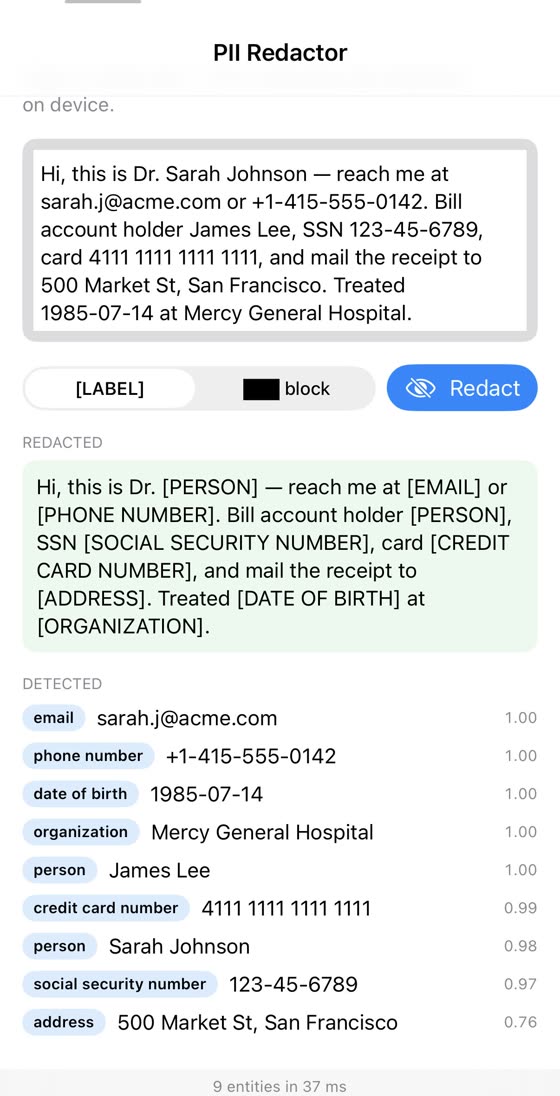
CoreAI.redact — GLiNER2 on iPhone
Decide without generating
A state and typed questions in, answers with probabilities out — the model writes nothing. Each question is one prompt scored at its answer slot, and the answer is the probability over the listed options. Three shapes:
import CoreAIOps

let a = try await CoreAI.decide(
    ticket,
    ["reply":  .noul("Does the customer expect a response today?"),          // yes / no → P(yes)
     "topic":  .choice("What is the ticket about?", ["billing", "delivery", "how-to"]),
     "anger":  .score("How upset is the customer?", levels: ["calm", "annoyed", "furious"])])
a["reply"]?.noul          // 0.91
a["topic"]?.choice        // "delivery"  (a["topic"]?.probabilities for every option)
a["anger"]?.score         // 1.4 — expected level on the 0…2 scale
a["reply"]?.timing        // promptTokens, reusedTokens, milliseconds
choice takes from 2 options up to the model’s maxOptions — 255 on minicpm5-2b,
per model — with Decision.Option(id:description:) when the model should read a
description and the answer report an id; score takes 2–10 ordered level descriptions and
answers the expected level plus the distribution; noul takes optional descriptions of what
yes and no mean. The request shape — a state, then questions keyed by id, each with
instructions and criteria — is the one the hosted typed-decision APIs use, so a client
written against one of them maps onto this call field for field.
One prefill, N decisions. Every question on the same state shares the prompt up to the end of the state. The op prefills it once and rewinds to it per question; the model-level API makes that explicit for an app that keeps deciding about the same thing:
let decider = try await TypedDecisions(catalog: "minicpm5-2b")
let ticket = try await decider.prefill(ticketText)             // the shared prefix, once
let reply = try await ticket.decide(.noul("Does the customer expect a response today?"))
let topic = try await ticket.decide(.choice("What is it about?", ["billing", "delivery", "how-to"]))
reply.timing.reusedTokens                                      // the state's tokens, kept
The default model is minicpm5-2b — the smallest catalog chat model whose zero-shot
decisions track its own full-precision readout on the published fixtures (141/144 argmax,
mean |Δp| 0.02; Examples/Decide has the tables). options: .model("minicpm5-1b") is twice
as fast at lower accuracy. The probabilities are read at the temperature the model’s catalog
entry records (CatalogEntry.calibration, 2.93 for minicpm5-2b, fitted on labelled rows by
decide-cli calibrate): the same answers, less over-confident. Which model
compares the other catalog models on JevBench’s items, on a Mac and on an iPhone.
TypedDecisions.Configuration.temperature overrides it; nil takes the catalog’s, and a model
without a record reads at its own. Decisions need the logits at the answer slot, so the model loads
on the sequential engine (or the static-shape engine for a Neural Engine bundle) rather
than the pipelined one. A recurrent hybrid (Qwen3.5, LFM2.5, Granite 4) cannot rewind its
state, so the kit checkpoints it after the state’s prefix — prefill(_:), or the first
question on a new state — and each later question on the state returns there and prefills only
its own tokens; timing.reusedTokens says what was kept.
Examples/Decide runs the shapes as whole uses — copy an email and a checkout form fills at
once, a contract read once and answered as a checklist, a folder sorted with what needs you
first, a passage reranker, a speech gate — on a Mac and on an iPhone from the same sources,
with two Shortcuts actions on the side.
Your existing System One client, on this machine. systemone serve
(brew install john-rocky/tap/systemone; from a checkout, decide-cli serve in Examples/Decide)
answers POST /v1/systemone in the hosted API’s request and answer forms over a catalog
model; point the client’s base URL at http://127.0.0.1:8090 and nothing else changes. The
server is SystemOneServer in CoreAIKit for an app that wants to listen itself. An app that
holds the same JSON — from a client, a file, a recorded request — answers it in-process with
CoreAI.systemOne: the hosted request form in, the hosted response out, the typed answers
beside the wire object, the model from options, else the request’s own model, else
CoreAI.decide’s default:
let r = try await CoreAI.systemOne(json: body)        // state, questions in request order, model
r["queue"]?.choice                                    // typed, by the request's key
r.usage.inputTokens                                   // as the wire counts it
let json = r.dumps()                                  // the reply, byte for byte what the server writes

let same = try await CoreAI.systemOne(                // or built in Swift, answers in this order
    state: ticket,
    questions: ["reply": .noul("Does the customer expect a response today?"),
                "queue": .choice("Which queue?", ["billing", "technical", "other"])])
The model-level form is decider.systemOne(request) on a TypedDecisions an app keeps warm;
the codec underneath is SystemOne.request(from:) / SystemOne.response(model:answers:).
From a coding agent. systemone mcp (or decide-cli mcp from a checkout) is the same over
the Model Context Protocol: claude mcp add systemone -- "$(brew --prefix)/bin/systemone" mcp
(Codex: codex mcp add …; Cursor: ~/.cursor/mcp.json) and the agent’s sessions get a
decide tool that takes the request above as its arguments and returns the response as
structuredContent, plus models. The server is SystemOneMCPServer in CoreAIKit and the
message forms SystemOneMCP, for an app that is the MCP server itself:
let server = SystemOneMCPServer(defaultModel: CoreAI.defaultDecisionModel)   // stdin/stdout by default; any FileHandle pair
try await server.run()                                                        // returns when the input closes
A model trained for this. decider-0.8b (catalog kind decision) is not a chat model:
it was fine-tuned to answer exactly these typed questions at an answer slot, and the kit
renders it in the plain form it was trained on (Decision.Format.decider, chosen from the
catalog kind) at its card’s temperature. Its probabilities follow the model’s own fp32
readout on the model’s fixture (decide-cli parity: 43/43 rows token-identical and
argmax-identical, max |Δp| 0.0088). It ships as a decode-only
graph on a recurrent hybrid, prefilled one token at a time: with the state checkpointed a
decision takes 186 ms on an M4 Max against minicpm5-2b’s 51 ms (825 ms with every prompt from
scratch; 2026-09-24); pick it when the probability has to mean something and the chat model’s
zero-shot answer does not.
let trained = try await TypedDecisions(catalog: "decider-0.8b")   // Format.decider, T = 1.03
let a = try await trained.decide(ticket, .score("How upset is the customer?", levels: ["calm", "annoyed", "furious"]))
a.score            // expected level; a["…"] for the op form
A decision model with a head of its own. openthai-systemone (Thai + English, kind
decision) answers at a 256-way head instead of the vocabulary, so a choice may list up to
255 options and every answer carries the probability that none of them fits
(Decision.Answer.abstain). The bundle declares that head, and the kit reads it in the
author’s own control-token form (Decision.Format.slot, chosen from the bundle’s metadata):
token-identical and argmax-identical to the author’s fp32 readout on all 50 of its fixture
rows (int8 max |Δp| 0.023).
let thai = try await TypedDecisions(catalog: "openthai-systemone")   // Format.slot, temperatures from the bundle
let team = try await thai.decide("ลูกค้าแจ้งว่าโดนหักเงินซ้ำสองครั้ง ขอเงินคืนด่วน",
    .choice("ทีมใดควรรับผิดชอบ", ["billing", "technical", "sales"]))
team.choice        // "billing"
team.abstain       // P(none of these), reported beside the option probabilities
A decision model for agent steps. apus-decision-v1-4b (English + Chinese, kind decision)
keeps its LM head and is read at the letters A–P after a Shared state: + JSON task turn under
its chat template (Decision.Format.sharedState, named by the catalog entry’s format). Its
choices take 2–16 described criteria and its yes/no a proposition; a score becomes a choice over
its levels. Token-identical to the author’s compiled prompts on the fixture’s 40 choice and
yes/no rows (max |Δp| 0.0055); a 4B, so about 2 s per decision on the Mac and no iPhone
number yet.
let agent = try await TypedDecisions(catalog: "apus-decision-v1-4b")   // Format.sharedState, T = 1
let next = try await agent.decide(pageState,
    .choice("Choose the next browser action that advances the goal.",
            options: [.init(id: "submit", description: "Submit the completed form."),
                      .init(id: "back", description: "Return to the previous page.")]))
next.choice        // "submit"
A calibrated decision model in plain text. qwen3.5-2b-decision (English, kind decision) keeps
its LM head and is read at the space-prefixed letters ` A… after a plain-text prompt with no chat
template (Decision.Format.decisionFunction, named by the catalog entry's format); its calibration
temperature is already in the weights, so T = 1. A choice takes up to 26 options, a yes/no is a choice
over yes / no, a score a choice over its levels. Token-identical to the author's rows on the
fixture's 58 (int8 max |Δp| 0.0079 against the fp32 reference); about 1 s per decision on the Mac,
3.0 GB int8, the size of qwen3.5-2b`.
let calibrated = try await TypedDecisions(catalog: "qwen3.5-2b-decision")   // Format.decisionFunction, T = 1
let section = try await calibrated.decide(newsSentence,
    .choice("Which news section does this article belong to?",
            ["World", "Sports", "Business", "Science/Technology"]))
section.choice          // "Business"
section.probabilities   // one probability per option, in that order
A scoring head, non-commercial. system-one-scorer-4b (English, kind decision, CC BY-NC 4.0 —
CatalogEntry.license carries it; do not ship it in a commercial app) has no letters: each option
is its own row and a scalar head scores it (Decision.Format.scalar, declared by the bundle’s
metadata together with its temperature 1.75 and its 384-token rows). Up to 64 options; a yes/no is
the rows yes / no, a score one row per level; a choice costs one forward pass per option.
Token-identical to the author’s 280 fixture rows (int8 max |Δp| 0.011); about 2 s per three-option
decision on the Mac, 5.1 GB, Mac only.
let scorer = try await TypedDecisions(catalog: "system-one-scorer-4b")   // Format.scalar, T = 1.75 from the bundle
let team = try await scorer.decide(ticket,
    .choice("Which team should handle this?", ["billing", "shipping", "technical"]))
team.choice          // "billing"
team.probabilities   // one per option: the rows' scores, softmaxed at the author's temperature
About an image. decider-2b-vision (catalog kind visionDecision, Apache-2.0) is the decider
transplanted into Qwen3.5-2B’s vision-language model: the same three shapes about an image and a state,
every question of a call read in one pass at its own answer slot, the model seeing the image, the state
and all the questions. A choice lists up to 10 options (the letters A–J); a yes/no is the choice
no / yes; a score lists its levels and answers the expected level. grid is the square the image
is resized to (the aspect ratio is not kept): .g256 (64 image tokens) for game frames and speed,
.g448 (196) for photos, its tower downloading the first time it is asked for. 3.3 GB with the g256
tower; an iPhone app needs the increased-memory-limit entitlement. About an image
has the numbers. Not behind /v1/systemone: the wire form has no image field.
let a = try await CoreAI.decide(
    image: frame, "You control the right paddle. The image shows the current game screen.",
    ["move": .choice("What should you do right now?", ["move paddle up", "move paddle down", "stay"]),
     "ball": .noul("Is the ball moving toward your paddle?")])
a["move"]?.choice        // "move paddle up"
a["move"]?.timing        // imageSeconds (decode, resize, tower) and decoderSeconds, beside the total

let decider = try await KitVisionDecider(catalog: "decider-2b-vision", grids: [.g448])   // the model level
let seen = try await decider.decide(image: photo, state: "This is a visual question about the image.",
    questions: [.choice("How many people are in the photo?", ["none", "one", "two", "three or more"])], grid: .g448)
Your own readout. decide reads the answer as a softmax over one letter token per
option. A library with its own scoring, one that sums the case and space variants of each
label, measures how much probability landed on the allowed answers and then calibrates,
renders its own prompt with the bundle’s tokenizer and asks for the logits at the last
position:
import Tokenizers                                                    // swift-transformers

let decider = try await TypedDecisions(catalog: "minicpm5-2b")
let tokens = try decider.tokenizer.applyChatTemplate(                 // the bundle's own tokenizer
    messages: [["role": "system", "content": mySystemPrompt],
               ["role": "user", "content": myQuestion]],
    tools: nil, additionalContext: ["enable_thinking": false])
let scored = try await decider.logits(for: tokens.map(Int32.init))
scored.values[yesTokenID]      // one logit per vocabulary entry, at the answer slot
scored.timing.reusedTokens     // what the engine kept from the previous call
The KV cache is the one decide uses: the longest prefix in common with the previous call
is kept and only the tail runs, and prefill(tokens:) loads a shared prefix ahead of the
first question. A recurrent hybrid keeps less: a call that extends the previous one continues
from it, and one that starts with the state prefix a decision or prefill(_:) checkpointed
returns there; anything else is prefilled whole and reports 0 reused. prefill(tokens:) takes
no checkpoint, so on a hybrid it saves only the call right after it, when that call starts
with the prefilled tokens.
Chat, tools, and guided JSON
Streaming chat with history, live stats, and a stop button — ChatSession:
import CoreAIOps

let chat = try await ChatSession(model: .qwen3_0_6B)
for try await event in await chat.streamResponse(to: "What is the capital of Japan?") {
    if case .response(let delta) = event { print(delta, terminator: "") }
}

ChatSession — Youtu-LLM-2B on iPhone
Tool calling rides Apple’s FoundationModels API — your Tool implementations work
unchanged behind a local model:
let model = try await KitLanguageModel(model: .qwen3_0_6B)
let session = LanguageModelSession(model: model, tools: [WeatherTool()])
let answer = try await session.respond(to: "What's the weather in Sapporo?")
Schema-valid JSON by construction (constrained decoding; needs
engineVariant: .sequential, ~0.6B-class models):
let model = try await KitLanguageModel(model: .qwen3_0_6B, engineVariant: .sequential)
let session = LanguageModelSession(model: model)
let plan = try await session.respond(to: "Plan a day in Kyoto.", generating: TravelPlan.self)
See docs/GETTING_STARTED.md for the support matrix and Examples/FMToolDemo /
Examples/GuidedDemo for runnable versions. Examples/ChatDemo is the full chat app
(~150 lines, built from CoreAIKitUI components).
Understand images
import CoreAIOps

let text  = try await CoreAI.caption(imageAt: photoURL)              // or .detailed
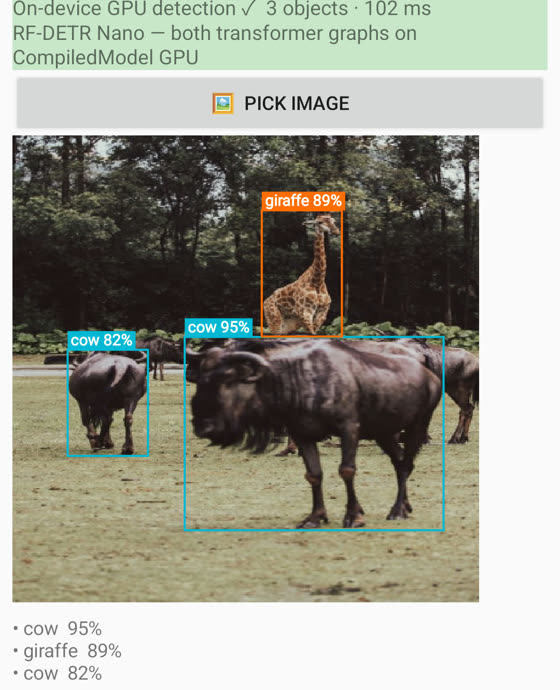
let boxes = try await CoreAI.detect(in: photo)                       // [Detection], no NMS
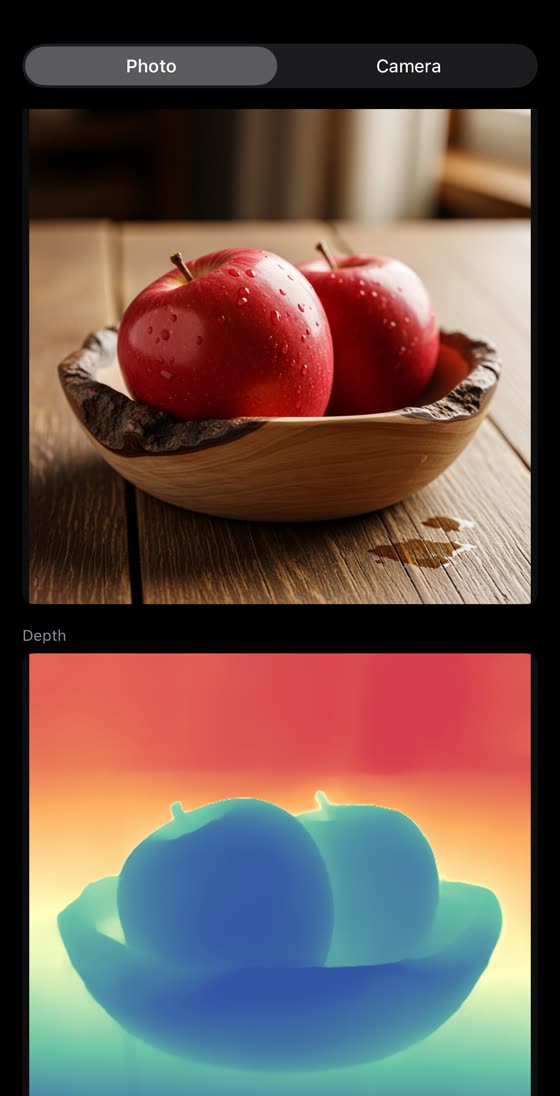
let depth = try await CoreAI.estimateDepth(in: photo).cgImage()      // grayscale render
let big   = try await CoreAI.upscale(photo)                          // ×4, deterministic
 |
 |
 |
|---|---|---|
CoreAI.detect — RF-DETR |
CoreAI.estimateDepth — DA3 |
CoreAI.upscale — AdcSR ×4 |
A conversation about an image (follow-up questions, one session) is the model-level VLM behind the same FoundationModels API — attach the image to the prompt:
let vlm = try await KitVisionModel(catalog: "qwen3-vl-2b")
let session = LanguageModelSession(model: vlm)
let answer = try await session.respond(to: Prompt {
    Attachment(cgImage)
    "How many people are in this photo, and what are they doing?"
})
Examples/VLChat is the full image-chat app; Examples/DetectCamera runs detection at
camera rate (hold a KitDetector there — the op is a one-shot convenience).
Read documents
let markdown = try await CoreAI.read(documentAt: scanURL) // GLM-OCR, ~4 s/page
Tables survive as markup. Swap the engine per call: options: .model("mineru2.5-pro")
(2-stage layout → Markdown) or "unlimited-ocr". Examples/ReadDoc compares them on
your own scans.
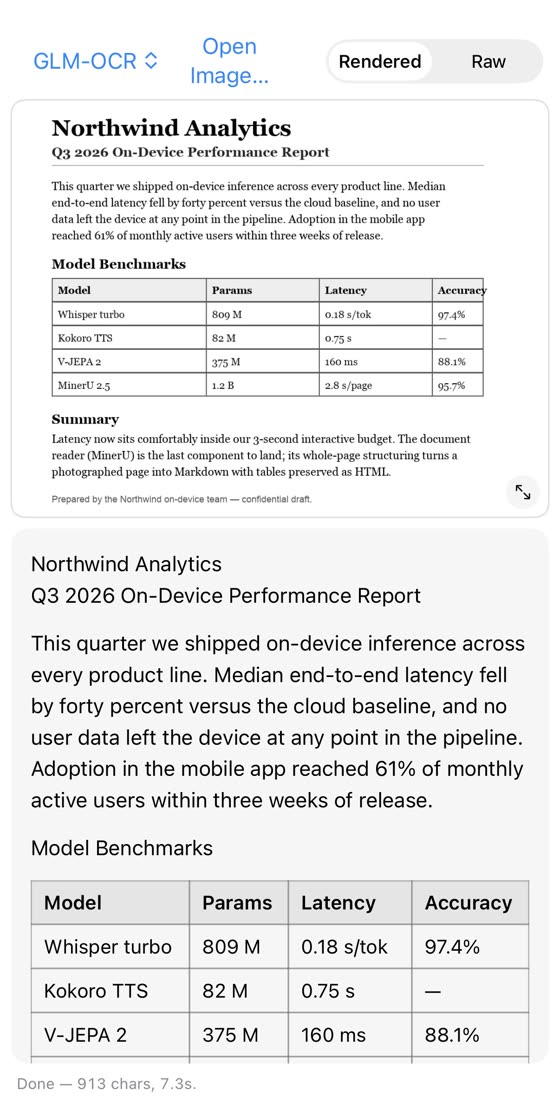
CoreAI.read — GLM-OCR, ~4 s/page on iPhone
Search and rank
Rank a handful of strings right now — one op:
let hits = try await CoreAI.search("refund policy", in: paragraphs, topK: 3)
A corpus you query repeatedly wants a persistent index — hold a TextEmbedder
(EmbeddingGemma, 768-d normalized) and store document vectors once:
import CoreAIOps

let embedder = try await TextEmbedder()
var docVecs: [[Float]] = []
for doc in docs { docVecs.append(try await embedder.embed(document: doc)) }  // store these
let q = try await embedder.embed(query: "refund policy")
let scores = docVecs.map { TextEmbedder.cosineSimilarity(q, $0) }  // rank by score
Photos by meaning (CLIP, one dot product per photo):
import CoreAIOps

let encoder = try await ImageTextEncoder()                      // CLIP ViT-B/32
let photoVec = try await encoder.encode(image: cgImage)         // store per photo
let query = try await encoder.encode(text: "red bike at the beach")
let score = ImageTextEncoder.cosineSimilarity(photoVec, query)
Document pages by meaning, no OCR (ColModernVBERT late interaction): see
Examples/DocSearch and VisualDocumentRetriever. Full RAG — retrieval as a tool the
model calls when it decides to — is Examples/DocChat (own index) and
Examples/SpotlightChat (Apple’s Spotlight as the index).
Hear and speak
import CoreAIOps

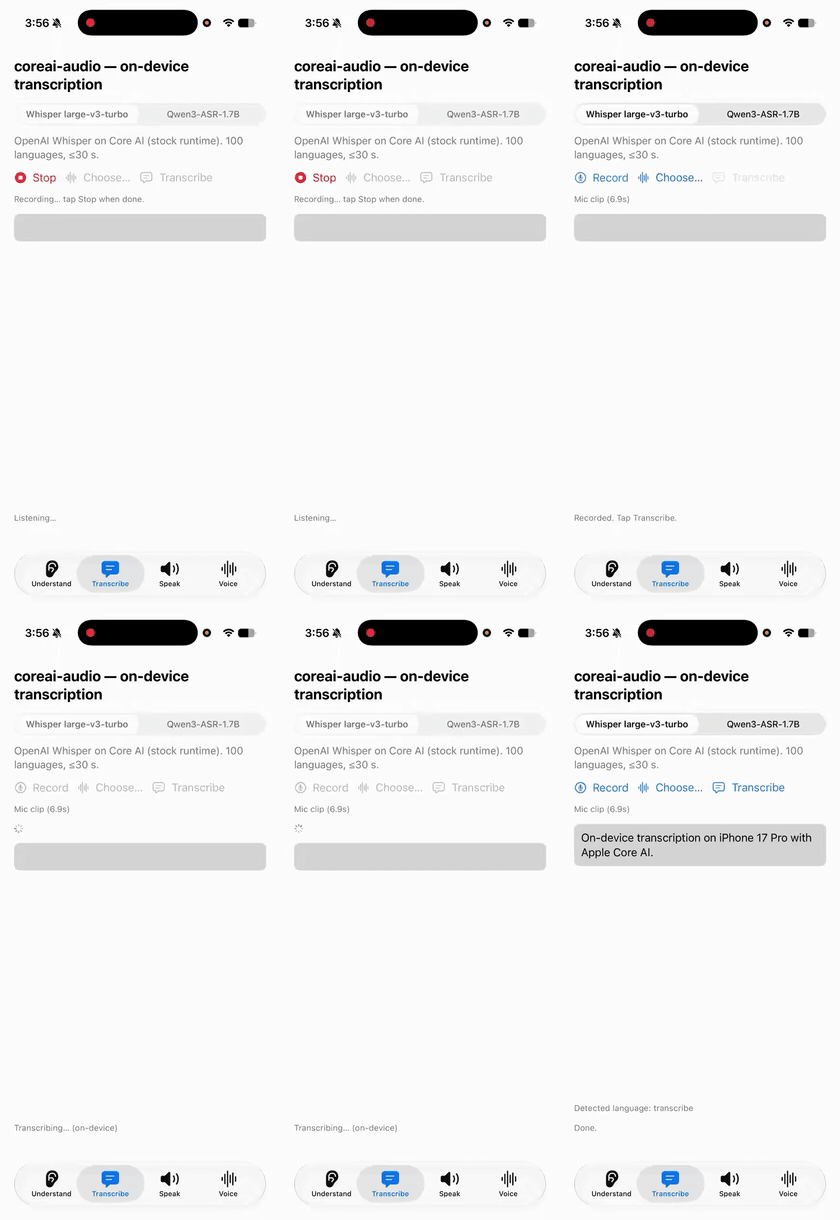
let text    = try await CoreAI.transcribe(memoURL)              // Whisper v3 turbo
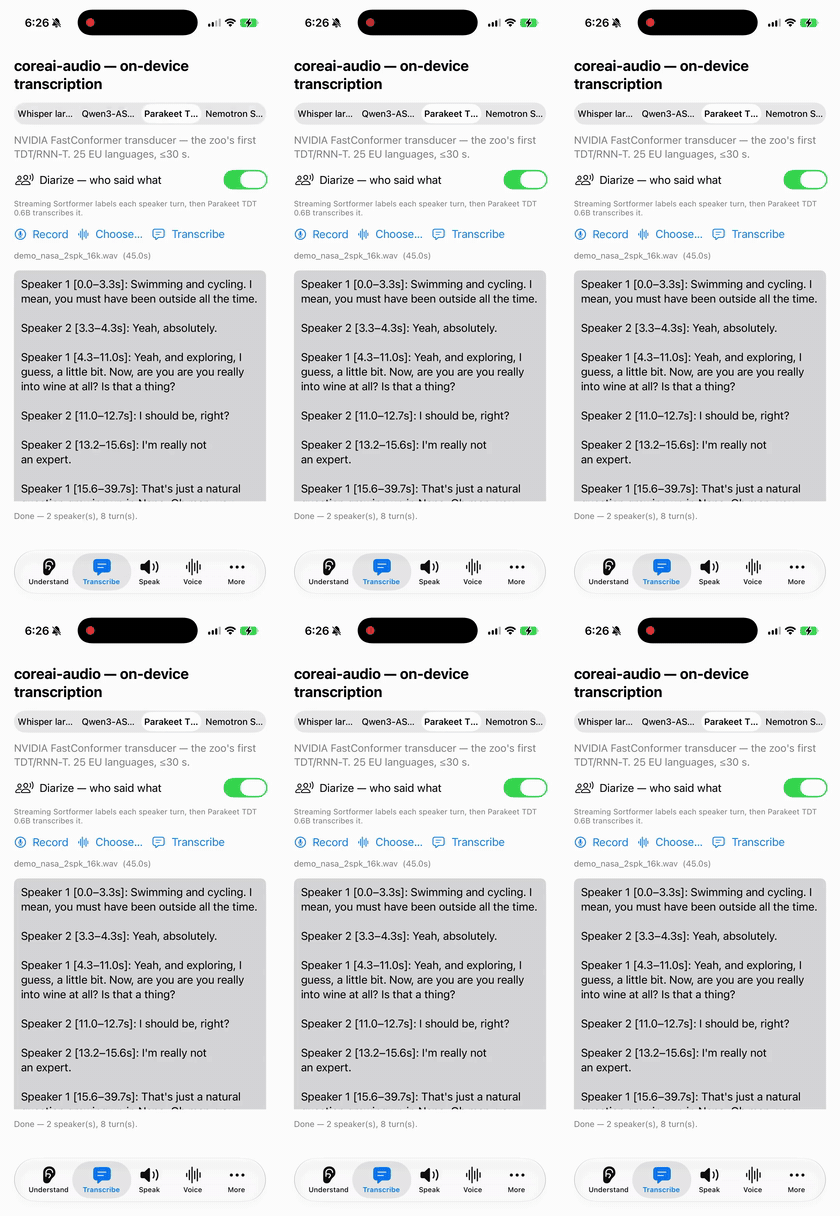
let meeting = try await CoreAI.transcribeMeeting(callURL)       // diarize + per-turn ASR
print(meeting.text)                                             // one line per speaker turn
let scene   = try await CoreAI.describeAudio(clipURL)           // sounds, music, setting
let voice   = try await CoreAI.speak("The build is green.")     // PCM + sample rate
let loop    = try await CoreAI.compose("warm lo-fi loop, vinyl crackle, 90 BPM")
let stems   = try await CoreAI.separate(songURL)                // vocals / instrumental
transcribe and transcribeMeeting take options: .model("parakeet-tdt-0.6b-v3") for
faster English-family ASR, or "qwen3-asr-1.7b" / "nemotron-3.5-asr-streaming-0.6b".
Playback / WAV writing from PCM: see Examples/OpsDemo (25-line WAV writer) and
Examples/Speak (streaming synthesis into AVAudioEngine).
 |
 |
|---|---|
CoreAI.transcribe — Whisper v3 turbo |
CoreAI.transcribeMeeting — Sortformer + ASR |
Video and live camera
let actions = try await CoreAI.recognizeAction(videoAt: clipURL)   // V-JEPA 2
print(actions.first?.label ?? "")   // "pouring something into something"
Live pipelines are a for-await loop over CameraFeed — hold the model-level driver so
nothing reloads per frame:
import CoreAIOps

let detector = try await KitDetector(catalog: "rf-detr")
for await frame in try await CameraFeed(framesPerSecond: 30).start() {
    let boxes = try await detector.detect(in: frame)
}
Examples/DetectCamera (33–39 FPS end-to-end), DepthCamera, and ActionCamera are
the full apps.
Forecast numbers
let f = try await CoreAI.forecast(dailySales)     // TimesFM 2.5 — ~25 ms warm
let nextWeek = f.mean.prefix(7)                   // f.quantiles for uncertainty bands
128 steps ahead from any univariate series; Examples/Forecast charts it.
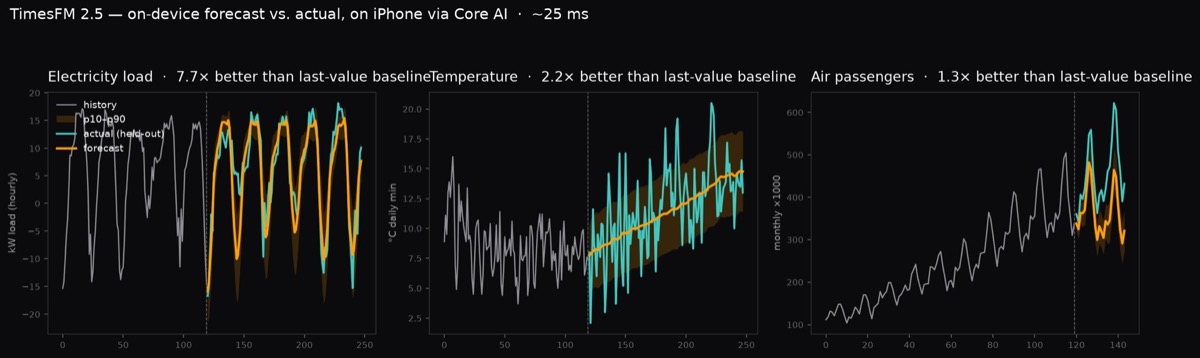
CoreAI.forecast — TimesFM 2.5 on iPhone
Plug into the system
- Siri — “ask my local model from Siri”, with onscreen awareness and risk-based
confirmation:
Examples/SiriAsk(App Intents, ≥4B model). - Visual Intelligence — your own VLM as an “ask” tab (
Examples/AskVLM), or your CLIP / RF-DETR behind the system’s visual search (Examples/VisualIntel). - Spotlight RAG — Apple’s
SpotlightSearchToolbehind your own model:Examples/SpotlightChat/Examples/SpotlightApp.
Escape hatches
Any stateless .aimodel you exported runs through the generic graph runner:
import CoreAIOps

let model = try await GraphModel(contentsOf: aimodelURL, computeUnits: .neuralEngine)
let out = try await model.run(["pixel_values": .float32(pixels, shape: [1, 3, 224, 224])])
- A chat bundle on disk:
ChatSession(bundleAt: url). - Any Hugging Face repo with the right layout:
ModelID("org/name", path: "macos"). - Manage the cache:
ModelStore.default.downloadedModels()/.delete(_:). - The live model list (ids for every
options: .model(...)):await ModelCatalog.load(), then.available(.chat)— or any other kind.